 Keelsheet
Schedule C Template for Excel and Google Sheets: Build One or Use Ours
Updated 2026-10-18 · Not tax advice
Short answer
A working Schedule C template has three tabs: a transaction log with a category dropdown, a category list that maps each category to its Schedule C line, and a summary that totals each line with SUMIFS and works down to net profit on line 31. You can build one in about an hour with the steps below, or use the Keelsheet Schedule C ledger, which adds monthly totals, a mileage log, a home office tab and error checks.
Figures used: Line numbers follow the 2025 Schedule C (Form 1040), the latest final revision on IRS.gov on October 15, 2026. Mileage rates are from the IRS standard mileage rates page: 72.5 cents a mile for January to June 2026 and 76 cents for July to December 2026. The 2027 mileage rate and the final 2026 Schedule C are not published yet.
Skip the math: the Keelsheet Tax Bundle (Calculator Spreadsheet + Schedule C ledger for Excel and Google Sheets). One-time purchase.
Buy the Tax Bundle · $22Calculator Spreadsheet only, $14 · 14-day refund if it doesn't work as described
Free: the one-page Q4 2026 estimated tax worksheet (printable, Excel or Google Sheets) and the quarterly estimated tax calculator.
Schedule C (Form 1040) is where freelancers, 1099 contractors and sole proprietors report business profit. The IRS only publishes it as a form. A Schedule C template is the spreadsheet you keep all year so that, at tax time, every line of the form is already totaled. This page shows what the template needs, how to build one in Excel or Google Sheets, and what a ready-made one adds.
What a Schedule C template needs
| Part | What it does | Why it matters |
|---|---|---|
| Transaction log | One row per payment in or out: date, description, payee, category, amount, receipt | The IRS expects records that back up each amount. Counting each row by its payment date is cash-basis accounting, which most freelancers use; an accrual-basis business needs the date income was earned or the expense incurred instead |
| Category list | Maps each category to a Schedule C line and a deductible percentage | Meals are generally 50%. Owner draws and estimated tax payments are 0% |
| Category dropdown | Data validation on the category column | Stops typos that drop a row out of the totals |
| Line summary | SUMIFS per line, then lines 7, 28, 29 and 31 | Line 31 net profit drives income tax and self-employment tax |
| Mileage log | Date, purpose, business miles, rate | Car expenses need a contemporaneous log (Pub. 463) |
| Year filter | Only counts rows dated in the tax year | Lets you keep using the file across years |
Not sure which line an expense goes on? Use the Schedule C expense categories list, or grab the free CSV of Schedule C lines as a lookup sheet. It lists the line first and explains each one in words, so it isn’t a ready-made Categories tab: copy the categories you use into the three columns in step 1 below.
How to build one in Excel or Google Sheets
- Create a Categories tab. Columns: Category, Schedule C line, Deductible %. Example rows: “Advertising, 8, 100%”, “Meals, 24b, 50%”, “Owner draw, none, 0%”.
- Create a Transactions tab. Columns A to F: Date, Description, Payee, Category, Amount, Receipt link. Enter every amount as a positive number.
- Add the dropdown. Select the Category column, then Data > Data validation, and point the list at the Category column of the Categories tab.
- Total each category. On the Categories tab, next to each category:
=SUMIFS(Transactions!E:E, Transactions!D:D, A2) * C2, where A2 is the category and C2 its deductible percentage. - Build the line summary. On a Summary tab, total each Schedule C line from the Categories tab:
=SUMIFS(Categories!D:D, Categories!B:B, "8")for line 8, and so on. - Work down to profit. Line 7 gross income (line 1 minus line 2 returns, minus line 4 cost of goods sold, plus line 6 other income). This simple build assumes you don’t carry inventory: if you do, figure line 4 in Part III (beginning inventory plus purchases, labor, materials and other costs, minus ending inventory) instead of totaling purchases straight into line 4. Then line 28 total expenses, line 29 tentative profit, line 30 home office, line 31 net profit.
- Add a year filter. Change the step 4 formula to
=SUMIFS(Transactions!E:E, Transactions!D:D, A2, Transactions!A:A, ">="&DATE(2026,1,1), Transactions!A:A, "<="&DATE(2026,12,31)) * C2so last year’s rows don’t leak in. Leave the step 5 Summary formula as it is: it totals the Categories tab, which is already filtered by year.
That gets you a working template. It won’t catch a missing category, a text-formatted amount or a row outside the year unless you add checks for those too.
Worked example: one quarter in the template
Fictional numbers. Maya is a freelance photographer and a sole proprietor. Her January to March 2026 rows, after the summary totals them:
| Schedule C line | What she logged | Amount |
|---|---|---|
| 1 | Three client payments: $6,000, $4,500 and $3,200 | $13,700 |
| 8 | Instagram ads | $300 |
| 9 | 400 business miles × $0.725 | $290 |
| 10 | Booking platform fees | $410 |
| 20a | Lens rental | $250 |
| 24b | Client lunch $120 × 50% | $60 |
| 27b | Editing software, $60 a month × 3 | $180 |
| None | $2,500 federal estimated tax payment (not deductible) | $0 |
| 28 | Total expenses | $1,490 |
| 31 | Net profit for the quarter ($13,700 − $1,490) | $12,210 |
The estimated tax payment is logged so Maya can see it, but the 0% rate keeps it out of line 28. Home office (line 30) is usually figured once a year, so she adds it in December.
On that $12,210, self-employment tax alone is $12,210 × 92.35% × 15.3% = $1,725.22, before income tax. That’s only the self-employment tax part, for a quarter, and assumes she has no W-2 wages counting toward the Social Security cap. It isn’t her next payment: a quarterly estimated tax payment also covers income tax, subtracts withholding and credits, and follows the safe-harbor rules and what she has already paid. See how much to set aside from 1099 income for the rest.
The Keelsheet Schedule C ledger
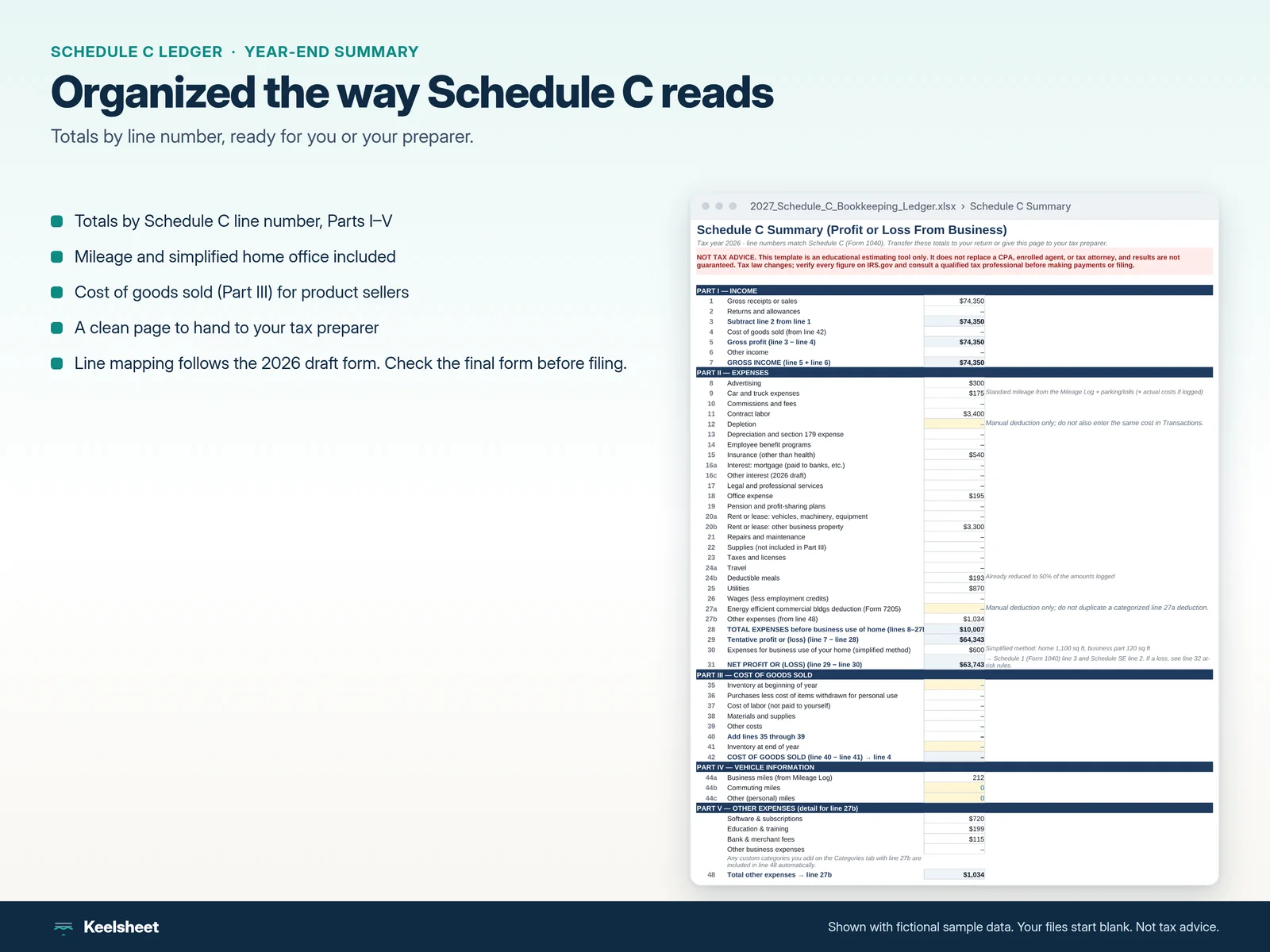
Everything above, already built and tested in Excel. Its Google Sheets copy link is included as a preview: that edition hasn’t passed our release checks yet (cover and chart visuals, and the newer Start here tab):
- Transaction log with 500 rows, a category dropdown and a status column that flags bad dates, invalid amounts, unknown categories and rows from another tax year.
- 37 categories mapped to Schedule C lines, including cost of goods sold (Part III) and non-deductible categories for owner draws, transfers and estimated tax payments.
- Schedule C Summary that totals each line down to net profit on line 31, plus a Monthly P&L.
- Mileage log with 300 trip rows and the IRS rate for each trip date (72.5 cents for January to June 2026, 76 cents from July).
- Home office tab for the simplified method: $5 a square foot, up to 300 square feet.
- Checks tab that lists anything to fix before you trust the totals, and a dashboard with income, expenses, profit and a set-aside amount.
The ledger comes in the Tax Bundle ($22) with the quarterly estimated tax calculator, which turns your ledger profit into each 1040-ES payment.
Skip the build: get the Schedule C ledger
Schedule C ledger plus quarterly estimated tax calculator. Excel, plus a Google Sheets preview copy. One-time price.
Launch offer: buy before the IRS publishes the official 2027 figures and the updated 2027 version is free.
Buy the Tax Bundle · $22Template tips that save you at tax time
- Log as you go. Monthly is the minimum. Matching a year of bank statements in April takes far longer.
- Keep receipts linked. A receipt column with a file link beats a shoebox.
- Use one business account or card, so every row in the log has a matching statement line.
- Record platform income gross and the fees on line 10, so your income matches your 1099-NEC or 1099-K.
- Check the new form each year. The IRS sometimes renumbers lines. Update the line column on your category tab when the 2026 Schedule C is final.
Choosing between a spreadsheet and software? See Schedule C spreadsheet vs QuickBooks vs Keeper and QuickBooks Self-Employed alternatives.
Sources
- Schedule C (Form 1040) 2025, IRS
- Instructions for Schedule C (Form 1040), IRS
- Standard mileage rates, IRS
- Simplified option for home office deduction, IRS
- Publication 463, Travel, Gift, and Car Expenses, IRS
- Publication 583, Starting a Business and Keeping Records, IRS
This guide is general information, not tax advice. Confirm figures with IRS.gov or a qualified tax professional.
FAQ
Is there a Schedule C template in Excel?
The IRS publishes Schedule C only as a PDF form, not as a spreadsheet. A Schedule C template is a spreadsheet you keep during the year that totals your income and expenses by Schedule C line, so filling in the form or handing it to a preparer is quick. You can build one with the steps on this page or buy a ready-made one.
Does a Schedule C template work in Google Sheets?
Yes. SUMIFS, data validation dropdowns and cross-tab references all work in Google Sheets. The Keelsheet ledger ships as an Excel file plus a Google Sheets preview copy link; that edition hasn't passed our release checks yet. Use the copy link rather than uploading the .xlsx, because converting it drops the formula protection.
What categories should a Schedule C spreadsheet have?
At least one per expense line you use: advertising (8), car and truck (9), commissions and fees (10), contract labor (11), insurance (15), legal and professional (17), office expense (18), supplies (22), taxes and licenses (23), travel (24a), meals (24b), utilities (25) and other expenses (27b). Add non-deductible categories for owner draws and estimated tax payments so they are tracked but kept out of the totals.
Should I track gross or net payouts from platforms?
Gross. Record what the client or platform paid as income on line 1 and the platform's fee as an expense on line 10. That matches the 1099-NEC or 1099-K you receive. If you record net deposits, don't also deduct the fees.
Can a spreadsheet replace bookkeeping software?
For many sole proprietors with one business and a manageable number of transactions, yes. Software earns its fee if you need bank feeds, invoicing or payroll. See the spreadsheet vs QuickBooks vs Keeper comparison for the trade-offs.
Plan your payments with the Keelsheet Tax Bundle
Quarterly estimated-tax calculator and Schedule C ledger for Excel and Google Sheets. One-time purchase.
Launch offer: buy before the IRS publishes the official 2027 figures and the updated 2027 version is free.
14-day refund if it doesn't work as described · Also on Gumroad · Etsy
Free reminder
Don't miss the Jan 15, 2027 estimated-tax deadline
One email a week before each quarterly due date (Jan 15, Apr 15, Jun 15, Sep 15), with a 2-minute checklist. No spam; unsubscribe anytime.
Reminders only, not tax advice. See our privacy policy.